How an Anti-Slop Registry Stops AI-Generated Code from Violating Your Engineering Standards

AI writes compilable code that passes linting rules and reads cleanly (most of the time). Ironically, that’s also the root of the problem. The code looks right, so it goes through AI review without much hassle, and three weeks later you’re debugging a partial-write bug because an agent decided to write directly to the users table. 😄
There’s a name for that kind of output, and it’s “slop”. I’m not talking about broken code here, just code that ignores the standards your team has spent years defining and learning. And since an AI agent can produce slop faster than any human can flag it, it accumulates at a rate your review process was never designed to absorb.
In this article, we’ll elaborate on what AI slop is, why your current guardrails miss it, and how Verify uses invariants to verify (pun intended) AI-generated code against your standards at the same speed your assistants produce it.
TL;DR The best way to keep AI-generated code from violating your engineering standards is to verify every change against those standards automatically, before it gets merged. An anti-slop registry can help you out with this. Think of it as a catalog of invariants or the standing rules every change must respect. They are applied automatically to every matching change, so violations are caught before a human even opens the diff. This way, you’ll stop shipping AI slop without adding review headcount.
What “Slop” Actually Means
Slop is not the same thing as a syntax error. Your tooling already does a good job at catching those. Slop is the set of choices an AI agent has made that are technically valid but logically wrong.
For instance, it’s a handler that skips the authentication middleware because the agent didn’t know it was mandatory. Or maybe it’s logging done with print instead of the structured logger every other service uses. Or it’s an error path that returns cleanly but never emits the metrics counter your dashboards depend on.
None of these will necessarily fail a test or trip a linter. However, a senior engineer would flag each of them in a review. In fact, they’ve probably flagged them more than once.
Why Existing Guardrails Miss It
Now, you’re probably thinking, “I already have guardrails. How come they don’t stop slop?” Here’s why it happens.
Linters Spot Syntax and Known Anti-Patterns
Linters were never meant to encode “writes to the users table must go through UserRepository.” That sort of rule lives in your team’s collective memory, not in a config file, and writing a custom rule for every convention your team holds is a project nobody has time for.
Human Reviews Catch a Lot, but Not Everything
The first PR of the day goes well. By the tenth, your energy levels have dropped, your focus has become fuzzier, and things start to get approved in a blur. Our cognitive bandwidth simply doesn’t scale with the volume of code AI can produce. Maybe we will evolve eventually, but as of now, we haven’t. 😅
AI Review Reads the Diff and Comments
AI review does help at the margins, but it has no external reference point for what your team requires. It’s simply one model checking the output of another model.
The common thread here is that none of these tools hold a durable, team-defined record of what every change must respect. However, that kind of record is what an anti-slop registry provides.
Registry As a Catalog of Invariants
In Verify, there’s an invariant catalog that works as an anti-slop registry. These invariants are basically rules defined by the team, and they apply to every matching change.
Though they may seem similar to acceptance criteria, the distinction between the two is actually very simple:
- Acceptance criteria describe what this particular change is supposed to do. The endpoint returns the right fields, and the subscription lookup returns a 404 when nothing exists.
- Invariants describe what every change needs to abide by. No direct writes to the users table, for example. 😁
While acceptance criteria are written for each change, invariants are only written once. They apply to everything until you decide to revise them. That is why they are often referred to as org invariants. They are non-negotiable, and they aren’t related to a single ticket. The whole organization needs to comply with them.
A good invariant is the one that captures something your team had to learn the hard way. This could be a comment a reviewer had to type a couple of times, for example. Encode it once, and no reviewer will need to type it ever again.
Building the Registry Without Writing It by Hand
The fastest way to fill out your catalog is to mine what precisely your team is enforcing already. Verify gives you four sources, ordered by how much effort they require.
| Source | What It Does |
|---|---|
| Mine PR history | Aviator’s AI reads your team’s actual PR review comments and proposes invariants from the patterns it finds. |
| Extract from Docs | Files like CONTRIBUTING.md and LLM.md are parsed into draft invariants. |
| Adopt from Templates | A starter library covers the common categories: security, observability, data access, and backwards compatibility. |
| Author Manually | You write the rule directly. |
Every AI-drafted invariant lands in draft status. The selector ignores drafts, so nothing produces a verdict until an admin reviews the wording and promotes it to active.
How the Registry Stops Slop Automatically
You don’t tag invariants onto changes by hand, and your developers don’t have to remember which rules apply.
When a change is submitted, Verify creates a Runbook. A selector reads the Runbook’s intent, the acceptance criteria, and the change that’s been set, then uses an LLM to pick which catalog entries defensibly apply.
Selected invariants are materialized as acceptance criteria, tagged source: baseline_invariant, and sent through the same verifier pipeline as everything else. Code-scans perform structural checks, runtime scenarios handle behavioral ones, and the verdict and evidence land on the same review surface as the user-supplied criteria.

How a rule travels from the registry to a verdict, without anyone tagging it by hand
Two things follow.
First, developers never think about invariants when writing intent. Their acceptance criteria stay focused on the change itself, and the selector handles eligibility. Second, an invariant verdict looks identical to a normal criterion verdict. The only differences are the source tag and the fact that invariant criteria cannot be edited per change. They can only be waived, and only for a reason.
You can narrow down eligibility with conditions, using a file_path_glob like src//.go or a language match. However, remember to rely on them sparingly. Conditions are meant for hard exclusions like a language-specific rule, not fine-grained scoping. The selector already reads the change context and passes on the rules that don’t fit.
Writing an Invariant That Holds Up
An invariant is only as good as its wording. Here are three rules that help keep them durable.
- Be specific about the assertion, but vague about the implementation. Write “all HTTP handlers must call an authentication middleware before any business logic,” not “use
AuthMiddlewarefromsrc/auth/middleware.go.” The first survives a rename, while the second breaks the moment someone moves a file. - Make the rule verifiable in isolation. “**All migrations must declare a
downblock” can be checked from the diff. “All migrations must be reversible” cannot be checked without running them backwards. - Do not write the fix. State the rule and let the verifier explain what’s wrong.
When an agent violates the rule, the verdict points at the offending line and explains the violation. It doesn’t prescribe the fix, but that part is deliberate. The reviewer and the author decide how to resolve it best.
Where the Registry Fits
Invariants are only one layer of the stack, not the whole defense. Verify checks a change across three layers, deliberately built as the Swiss cheese model. This means that no single layer catches everything, but together, they cover each other’s gaps.
- Org invariants catch the non-negotiables that apply everywhere. Some examples include no hardcoded secrets, auth on every endpoint, or structured logging.
- Domain contracts apply to specific parts of the codebase. The billing module uses the
Moneytype, and the payments domain emits an event on every state change. - Acceptance criteria are specific to the change at hand.
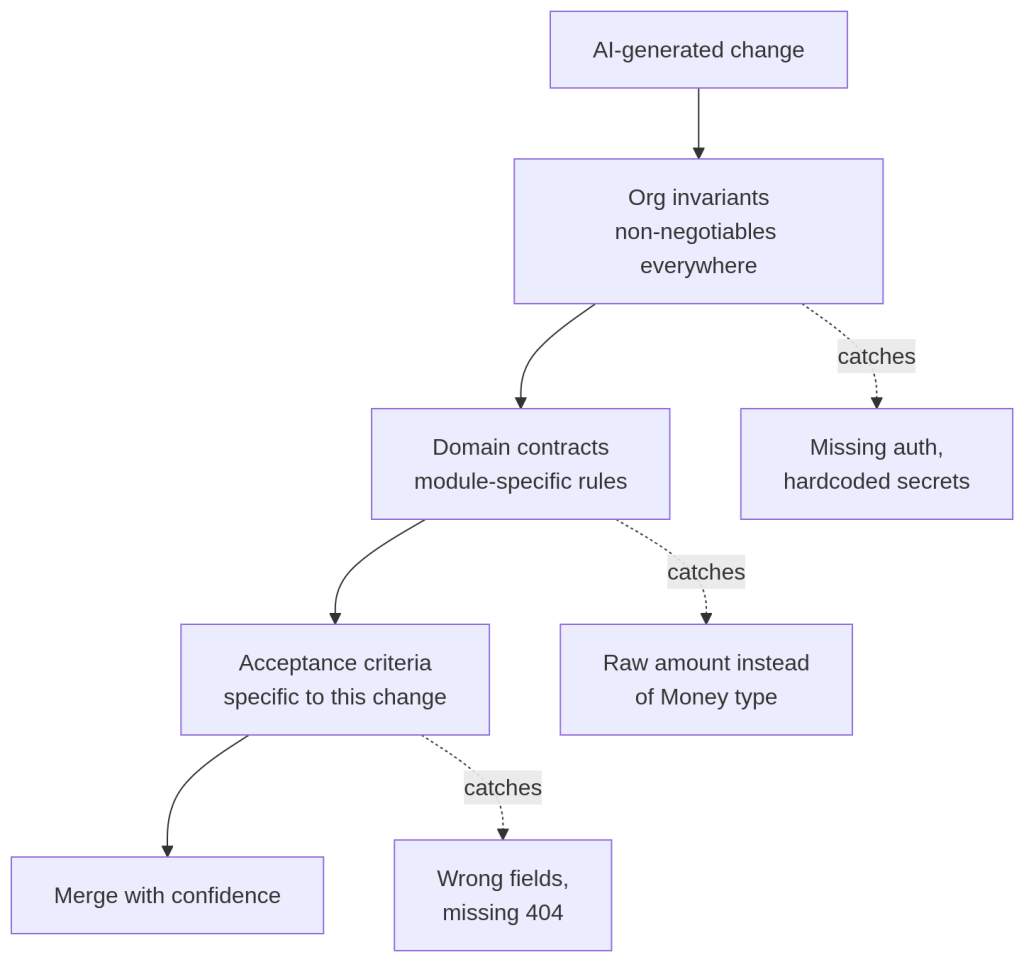
Each layer catches a different class of slop. Together they leave little room for it to pass
Next Steps
You do not need to encode every rule for this to pay off. Start with the data ingestion. Let it read your PR history, and promote the handful of drafts that match the comments you are tired of writing. That alone removes the most common slop from your review queue. From there, set up org invariants by hand for the rules that matter most, and tune the wording when a verdict surprises you.
The registry compounds. Every rule you encode is a comment no reviewer needs to type again and a class of slop no agent can ship past you. Aviator Verify makes sure that code that looks right also respects your standards at the speed your agents are working.
Frequently Asked Questions (FAQ)
How do you keep AI-generated code from violating your engineering standards?
Check every change against a set of team rules automatically, before the code merges. These rules catch things linters miss, like which module is allowed to write to the database, and flag them before a human even reviews the code.
How do large engineering teams scale code review when using AI coding assistants?
Write your review standards down once as org invariants so that they apply to every change on their own.
Is an anti-slop registry just a fancy linter?
No. A linter checks syntax from a fixed ruleset, while a registry encodes your team’s own conventions and explains each violation using evidence.
How do you verify AI-generated code in a monorepo?
Scope each rule to the folder it covers with a path glob so a billing rule only runs on billing changes. That way one registry can enforce different standards for many teams in a single repository.
What stops the registry from burying reviewers in noise?
The selector only applies rules that fit the change, so most stay dormant for the majority of the time. If a rule keeps getting waived, that is your signal it’s worded wrong and needs fixing.