Code Reviews at Scale: Best Practices for Teams Using AI Coding

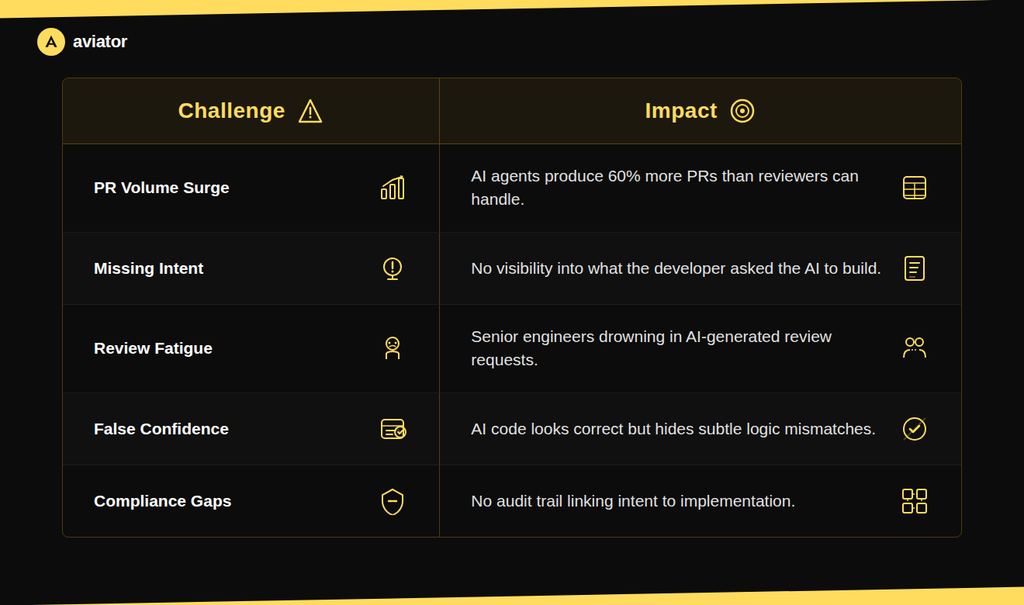
The traditional code review model was designed for a world where humans wrote every line and a reviewer could reasonably trace the author’s reasoning by reading the diff. That model breaks when an AI agent generates hundreds of lines in response to a short prompt.
AI coding assistants have changed the math of software development. Engineers using AI coding tools merge up to 60% more pull requests than those who don’t, and tasks that once took a full day can wrap up in an hour. But that acceleration has exposed a structural problem most teams didn’t see coming: code review hasn’t kept up. Meanwhile, 31% more PRs are merging with no human review at all, and main branch success rates have dropped to 70.8%.
AI-generated code is often described as “almost right, but not quite,” and that’s exactly what makes it hard to review. It passes a casual read while hiding subtle mismatches between what was intended and what was built.
The fix isn’t to review harder, it’s to review differently. When AI writes the code, the reviewer’s job shifts from “Does this logic look correct?” to “Does this match what we intended to build, and can we prove it?” That’s a fundamentally different question, and it calls for a different workflow.
AI code reviewers are useful, but they’re only sampling the code without knowing intent. They can’t verify that the implementation matches what you meant to build.
The most effective teams are moving toward an intent-verification model.
How intent-driven verification works
Aviator Verify replaces the traditional “write code, open PR, wait for review” cycle with a four-stage workflow that captures intent up front and verifies it automatically before a reviewer ever looks at the change.
Stage 1: Build with your preferred agent. Developers keep using whatever AI coding tools they already have — Cursor, Claude Code, Copilot, or anything else. No new editor, no behavior change.
Stage 2: Submit intent via CLI. When the implementation is ready, the developer runs /verify-submit through the Aviator CLI. This captures two things: the intent (a concise statement of what the change does and why, including non-obvious constraints) and a set of acceptance criteria: independent, verifiable assertions with clear pass/fail outcomes.
Stage 3: Verify end-to-end. The system routes each criterion through the appropriate verification path and produces a verdict with supporting evidence. This stage runs automatically — no human in the loop until it finishes.
Stage 4: Review behavior, not just code. Reviewers see intent, verdicts per criterion, and supporting evidence. The diff is still accessible, but it’s no longer the primary review surface. Reviewers can approve, waive a criterion with justification, or request alternative scenarios. Every decision is recorded.
Two layers of verification
One of the biggest challenges in code review, especially with reviewing AI-generated code at scale, is that reviewers have to hold the full context of what matters in their heads. What are the security rules? What patterns does this team avoid? What’s specific to this change?
Aviator Verify organizes these into two layers that stack hierarchically:
Org invariants are organization-wide rules that always apply, what we call an anti-slop registry.
These are the things your senior engineers flag in every review: authentication required on new endpoints, no hardcoded secrets, external input must be validated, SQL queries must be parameterized, error responses must include correlation IDs. Without invariants, you’d need to add “requires authentication” to every spec. Instead, they’re configured once by admins and automatically checked on every change.
Acceptance criteria are specific to the individual change — the endpoint path, the required response fields, the expected return values. These come from the developer’s submission and are unique to every PR.
Acceptance criteria are what this change should do. Invariants are what every change should respect, your team’s standing rules.
During verification, all applicable layers are checked simultaneously. Higher-layer rules can be overridden by lower layers when the spec intent explains why and the override is explicit and that override is recorded in the audit trail.
Invariants: encoding your team’s rules and review patterns
Invariants deserve special attention because they solve one of the most persistent problems in code review: the patterns your experienced reviewers catch over and over, review after review.
Aviator Verify captures these patterns as reusable, automated checks. Invariants flow through four phases:
Catalog. Invariants live in an account-level catalog. Admins can author them manually, adopt from templates, or accept AI-drafted ones. Three of the AI sources worth knowing about:
- PR-comment mining. AI reads your team’s actual PR review comments and proposes invariants from the patterns. The highest-leverage source — you’re already enforcing these in review, this just encodes them.
- Docs extraction. Your
CONTRIBUTING.md,LLM.md, or similar guidance files are read and proposed as invariants. - Repo-signal synthesis. AI looks at the shape of the codebase and proposes rules that fit.
Selection. When a runbook is submitted, an LLM selector reads the intent, the acceptance criteria, and the change set, and picks which eligible invariants legitimately apply to this change. Eligibility is gated by optional conditions on the invariant (e.g. file_path_glob: src/**/*.py); among the eligible, the selector decides what actually fits.
Materialization. Selected invariants are materialized as acceptance criteria on the runbook, tagged with source: baseline_invariant. From here they flow through the same verifier pipeline as user criteria — code-scan or runtime — and produce verdicts on the same review surface.
Reviews and waivers. Reviewers see invariant verdicts alongside user criteria. Invariant-sourced criteria can’t be edited per runbook (they’re catalog-managed), but they can be waived with a category. Every waiver is attributed and reasoned, and shows up in the audit trail.
What reviewers actually see
The review document in Aviator Verify is structured around three sections, not a diff:
Intent — the agreed-upon objective. What is this change supposed to accomplish, and why? This is what the developer submitted, and it’s what the reviewer validates first.
Evidence — verdicts and proof per criterion. Each acceptance criterion shows a pass/fail verdict and the supporting evidence: AST snippets for code-scan checks, screenshots and API responses for runtime checks. Reviewers can drill into the evidence or scan the summary.
Decisions — what the reviewer does next. Approve, request changes, waive a specific criterion with justification, request a scenario rerun, or access the preview environment directly. Every decision is timestamped and attributed.
The diff is still one click away for reviewers who want to inspect the code directly. But the primary review surface is intent and evidence, not lines of code. This is what makes the model scale: a reviewer can validate a 500-line AI-generated change in minutes by checking whether each criterion passed, rather than reading every line.
Audit trail and compliance
Every step in the Aviator Verify workflow is recorded as an immutable event: who submitted the intent, what criteria were generated, what verdicts came back, what evidence was captured, what decisions were made, and what exceptions were granted. The spec approval, implementation, and verification are separate actors, giving you segregation of duties by default.
This matters for compliance. SOC 2, ISO 27001, and similar frameworks require traceability from business intent to production code. Aviator Verify produces that traceability as a natural byproduct of the workflow — not as a separate documentation exercise. Teams can export compliance packages that link every production change to its approved intent, verification results, and business justification.
Aviator Verify is built around this model. If your team is producing more code than your reviewers can handle, request access or read the docs to see how intent verification works in practice.
Frequently Asked Questions (FAQ)
The most important shift is moving from line-by-line code inspection to intent verification.
Best practices include: capturing what a change should accomplish before code is generated, automating deterministic checks like linting, type validation, and security scanning so reviewers focus on business logic, encoding your team’s recurring review patterns as reusable invariants so they’re applied automatically, and producing verifiable evidence (screenshots, test results, request/response captures) that the implementation matches the original spec. The goal is to give reviewers intent and evidence instead of asking them to read every line of AI-generated code.
AI coding agents dramatically increase the volume and size of pull requests while removing the reviewer’s ability to trace the author’s reasoning through the diff. A developer using an AI agent might produce five or six PRs a day, and each one can touch more files than a typical human-written change. Reviewers need to shift from asking “does this code look correct?” to “does this code match what the developer intended?” This means reviewing against a spec or acceptance criteria rather than reading every line, and using automation to handle baseline quality checks so human review time is reserved for architectural decisions and business logic validation.
Intent verification is a code review approach where the developer’s original intent — what the change should accomplish, including acceptance criteria and expected behaviors — is captured before any code is written or generated. The implementation is then verified against that intent using deterministic checks, structural code analysis, and end-to-end test scenarios that produce concrete evidence.
AI code review tools analyze the diff and leave comments based on patterns and best practices, but they’re sampling the code without knowing what the developer intended to build. Each run can produce different comments, and there’s no structured way to verify that the implementation matches its purpose. Intent verification captures what the change should do before the PR is created, then systematically verifies each criterion against the actual code and running application — producing the same evidence for the same criteria every time, with a full audit trail.