How Verify Checks Code: Semantic Analysis, Runtime Previews, and Why It’s Not Just Another AI Review Tool

It’s Monday morning, and you’re eating the frog. A 4,000-line PR. An agent probably wrote it in under two minutes, and you’ve got a meeting in twenty. Be honest, are you gonna read all of it? I didn’t think so. 😄 You’ll just skim the diff, see green checks, and voila! LGTM!
Well, that’s where the real issue is. AI writes code faster than it’s humanly possible to perform reviews on it.
Using tools like Aviator Verify gives you a different approach. Instead of asking “Does this code look good?”, Verify checks whether it does what you intended it to. Verify verifies (duh) every acceptance criteria from an approved spec against the code using code analysis, execution scenarios, and your team’s rules. It proves that implementation actually matches your original intent.
TL;DR A linter checks whether code parses and follows style rules. An AI-based reviewer reads the diff and guesses what you’ve likely meant. Verify checks the running code against predefined acceptance criteria that your team has approved beforehand. The question is no longer “Does this look right?” It’s “Does this do what we’ve agreed to build?”. Deterministic where it can be, evidence-backed at all times, auditable by default.
What Verify Actually Does
Verify moves the human checkpoint earlier in the process, from reading 500-line diffs, to approving the intent before a single line of code gets written. You’re no longer reviewing the diff but the acceptance criteria.
Before the implementation starts, you and your agent agree on a spec: the scope + concrete criteria, like “returns 429 when rate limit is exceeded”. A human checks it, gives it a thumbs up. From there, the agent builds, and Verify checks the implementation against each criterion, with evidence for every result.
There are four steps in this workflow:
- Work locally with your agent: Step one is “keep doing what you already do.” Let Claude, Cursor or any other agent implement the task as usual. No changes there.
- Submit intent with Aviator MCP (Model Context Protocol): The agent captures your intent, generates acceptance criteria from what you’ve built, and submits both to Aviator in one shot.
- Aviator verifies end-to-end: Verify generates scenarios, applies team invariants, and runs them against changes (+ with evidence).
- Review the behavior, not the diff: You see every criterion with its verdict and proof. You then approve, waive with a reason, or ask for another scenario.
Alongside the criteria, there’s this thing called invariants. Invariants are your team’s recurring review comments, like “Always parameterize SQL queries”. They get encoded once as reusable chunks, so the same nitpicks don’t have to come up in every review.
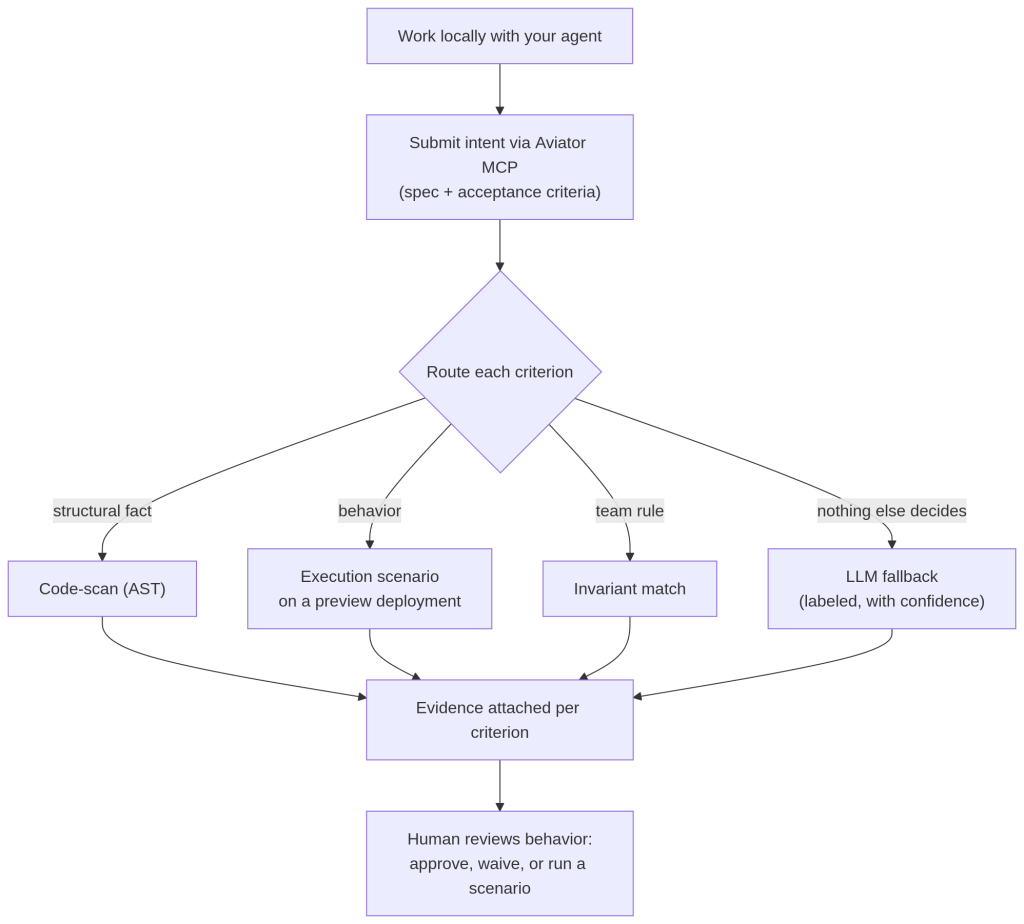
A change moves from your editor to an approved review. Each criterion is routed to the method best suited to give an answer
Checking Behavior, not Formatting
So what does “semantic” in “semantic analysis” mean?
Well, a syntactic check cares about the form:
- Does the code parse?
- Is it formatted right?
- Does it match style rules?
That is what linters do. But, a semantic check cares about meaning:
- Does the code actually do the thing the criterion describes?
Verify routes each criterion through the method best suited to answer it. Each of these methods leaves proper evidence along the way:
| Criteria | Verification Method |
|---|---|
| Requires authentication (check middleware chain) | Code analysis (AST) |
| No new dependencies (diff package files) | Code analysis (AST) |
| Returns 429 when the limit is exceeded (call endpoint) | Execution test |
| P99 (99th-percentile) latency under 200ms (benchmark) | Execution test |
| Complex or custom criteria | LLM fallback, labeled |
For structural facts, Verify analyzes the abstract syntax tree (AST):
- Endpoint exists?
- Return types match?
- New dependencies added?
As for behavior, Verify exercises the code and observes what happens, and that’s precisely what pattern matching misses. A function can parse cleanly and pass style checks, while skipping a case that was in the acceptance criteria but never in the code.
Why Reading the Code is Not Enough
Can you tell, just by reading a diff, whether an endpoint returns a 429 under load? Not reliably. You can see the code that is supposed to do it, but behavior is something you observe, not infer from a static read.
That’s why Verify runs against a live build. For behavioral criteria, an agent exercises the change end to end on a preview deployment and captures evidence. Screenshots, tool calls, request and response pairs… Just painting the picture here.
For the rate-limit example, this means firing 101 requests and catching the 429 on the one that trips the limit. The proof is attached directly to the criterion it verifies.
Not Just Another Linter
Rhetorical question, since the title has raised it: what separates Verify from the tools already in your CI pipeline?
Well, both linters and AI reviewers share one blind spot. They sample the code without knowing what the change was for.
A linter or scanner (ESLint, Semgrep, Snyk) applies fixed rules. It’s deterministic and fast, but blind to this change’s intent.
An AI reviewer (CodeRabbit, Greptile) reads the diff and infers intent from names and context. Useful, but inference is not the same thing as verification, and it’s non-deterministic. You can test it: just run it twice and observe how you get different comments.
Things get even messier when the same model writes and reviews the code. It’s as if you’ve just handed a mirror to it.

| Linter / Scanner | AI Reviewer | Aviator Verify | |
|---|---|---|---|
| How It Works | Fixed rules on the diff | Reads diff, posts comments | Runs scenarios, checks invariants, scans code |
| Knows Your Intent | No | Guesses from the code | Yes, captured before the PR |
| Reproducible | Yes | No (new output each run) | Yes (same evidence per criterion) |
| Reference Point | Ruleset | Model’s judgment | Approved spec |
| Audit Trail | Findings log | Comments | Immutable record per criterion |
| Best for | Known bad patterns, security, style | Fast second opinion | Confirming intent match at volume |
✨
Worth saying: Verify does not replace your linters or AI reviewers. You should keep the scanners for syntax, style, and security and an AI reviewer for a quick extra pass. However, Verify would make a good addition for the layer neither can reach: checking whether the implementation matches what was agreed. 💪
A Real World Example
Let me run one change all the way through. Here’s the task: add rate limiting to a public API.
First up, you tell your agent: “Add rate limiting to /api/* endpoints and log the events,” and iterate until the middleware looks right. When you’re ready, the agent captures the intent (“Cap per-user request rate on public endpoints and surface a clear 429 so callers can back off.”), generates the acceptance criteria, and submits both through the Aviator MCP in a single call.
Verify takes over and routes each criterion:
- Returns 429 when exceeded goes to a scenario: It fires 101 requests and captures the
429. - No new dependencies goes to a code-scan: the
package.jsondiff gets grepped. - SQL uses parameterized queries matches an invariant (team rule #14).
- P99 latency under 200ms goes to an execution test in a sandbox.
You can see six of six criteria verified, each with detailed evidence. You open the preview deployment, hammer the endpoint once by hand to be sure, and approve.
Total human time: a few minutes. And that’s a few minutes spent on judgment, not scrolling. The audit record writes itself. (⌐■_■)
Going Further
AI generation has outrun human review. Simply adding another AI that reads the diff doesn’t really fix the underlying problem: the fact that it still doesn’t know the intent.
Verify checks the running code against the criteria you’ve approved upfront, deterministically where it can and with evidence at all times. It leaves an audit trail you can hand to an auditor and works alongside your linters and AI reviewers, not as a replacement for them.
If reading 4,000-line agent diffs on a deadline is a headache you don’t want to deal with anymore, you’ll be happy to hear that this is exactly the workflow Verify was built to replace. Install the MCP and submit your first intent, no credit card required.
- Product overview: aviator.co/verify
- Docs and setup: docs.aviator.co/verify
- The reasoning behind it: AI code review is still a review
Frequently Asked Questions (FAQ)
Is Aviator Verify just another AI code reviewer?
No. An AI reviewer reads the diff and infers intent, producing different comments with each run. Verify checks the running code against acceptance criteria you’ve approved before the PR, routing each criterion to code analysis, an execution scenario, or an invariant.
How is verification different from testing?
Tests check code against the behavior the author has expected, so an agent that misreads a prompt will write both the wrong code and the wrong tests that need to confirm the behavior.
Does Verify replace my linter or my human reviewers?
No. You should keep linters and scanners for syntax, style, and security and humans for approving the spec and resolving failures. Verify just adds the missing layer that confirms the implementation matches the approved intent and is backed by evidence.
How does Verify help with SOC 2 or ISO 27001?
Every change produces an immutable, timestamped record linking spec approval, implementation, and verification results. Those steps are performed by separate actors. Since the trail already exists, Verify can export compliance evidence packages on demand instead of requiring a manual audit reconstruction.