Building Reusable AI Workflows: Templates for Common Engineering Tasks

Coding with AI is dangerously fast. I mean, it’s not like you’ll get a ticket or something, but you can turn a prompt into a PR within a few minutes, and if you’re not cautious, bad things can happen.
Two engineers will prompt an AI agent in two distinct ways and get different results. At scale, these inconsistencies tend to pile up. Those two engineers do not need a better GPT model. What they do need is a standardized approach to prompting. Just because something works once doesn’t mean it works for the whole team. What’s missing here is the layer of reusable workflow templates everyone can follow.
Aviator Runbooks is a platform for spec-driven development, which features support for predefined, structured automation patterns that your whole team can utilize.
TL;DR – Ad-hoc prompting is not the way to go. You can start there, but you can’t really advance while relying on it exclusively. Templates change the workflow entirely. One-off prompts get repeatedly executed and the AI’s output goes from “pretty good” to something you can actually trust at scale.
Why Ad-Hoc Prompting Is Not So Great
You approach prompting in your own way, and that’s fine. But everyone has their way of talking to AI. Someone writes paragraph-length prompts, whereas someone else just throws a sentence and iterates. Personally, I tend to write half-baked prompts and delete the chat later on, but that’s just me.
The output will be directly influenced by your prompt. Constraints, guidance, and additional context help the AI generate a better output. Not having any standard is maybe fine as a solo dev. But with five engineers on a team, things can quickly go south.
There is also the issue of knowledge retention. When you figure out the right way to prompt for a specific task (let’s say, safely migrating some part of code), that knowledge lives just inside your brain. Maybe you dump your thoughts in a Notion doc, but realistically, no one reads those. When you leave, that AI know-how leaves with you.
And since prompts are ephemeral, there is no feedback loop. Nobody knows which approaches have produced the cleanest PRs.
Specs and templates solve all the problems mentioned above. A template is essentially a prompt that has matured. It’s now structured, and as such, it can be validated and shared across the team.
The Structure of an AI Workflow Template
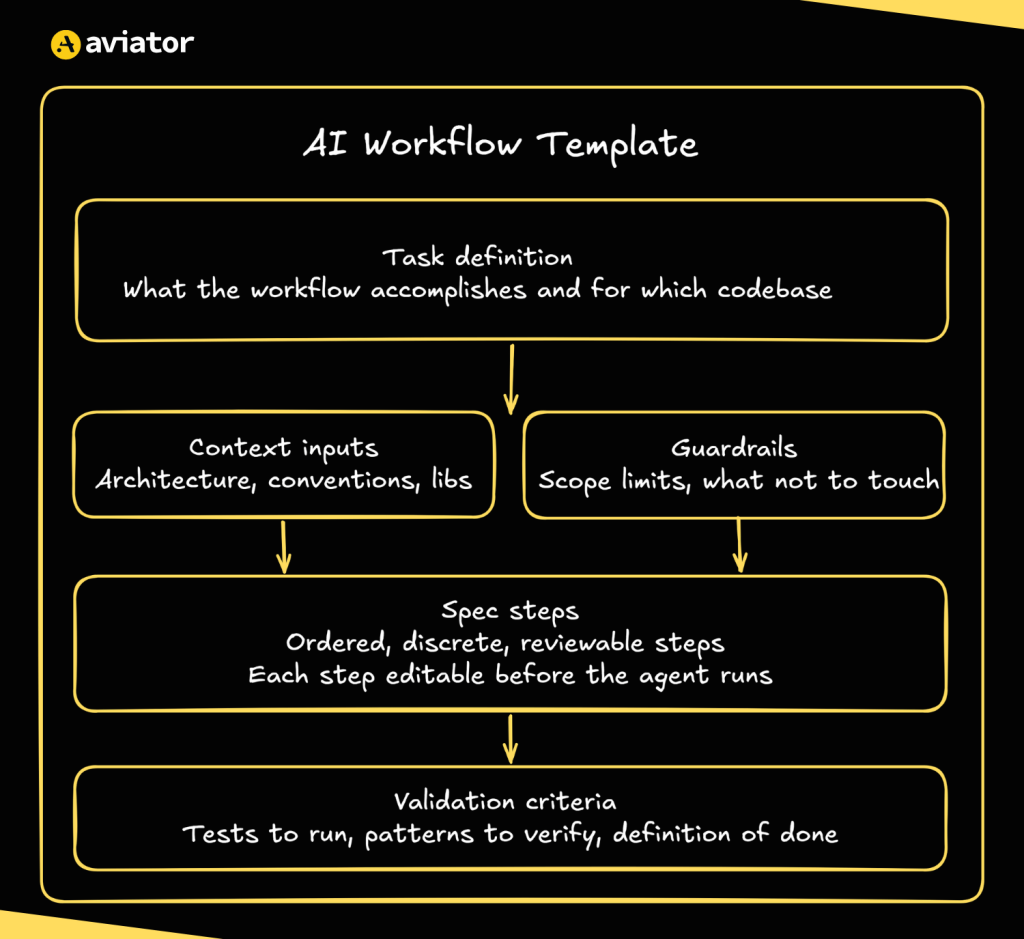
The structured AI workflow
When it comes to good AI prompt templates, its not just about the length. The template should be structured in a way that gives an agent everything it needs in order to understand, plan, and execute a task. The key components of a template are:
- Task definition: A clear description of what you want to accomplish. It shouldn’t be vague (
change this) but specific (migrate React class components to functional components, preserving all existing behavior) - Context inputs: What the agent needs to know about your specific codebase before it starts. This could refer to a specific file, a directory, which libraries to use, etc.
- Spec steps: Breaking down the plan into specific, ordered steps. Each step should be reviewable and editable before the agent starts working.
- Guardrails and constraints: Limiting what the agent should do under certain circumstances. By setting explicit scope limits, you prevent the agent from making breaking changes.
- Validation criteria: What marks a task as done? This might include running a test command or checking specific outputs against expected results. Through this component, you let the agent know when the task is considered done.
3 Templates for Common Engineering Tasks
I have also compiled 3 agentic AI workflow templates you can use directly in the Runbooks.
React Class to Hooks Migration
Legacy React codebases are full of class components that nobody dares to touch. However, sometimes a rewrite can’t be avoided; new libraries, performance issues, and all sorts of stuff push you there. When it happens, a template like this can help:
Goal: Migrate React class components to functional components with hooks.

Scope: [list the target directory or component files]

Steps:
1. Identify all class components in scope
2. Map lifecycle methods to useEffect equivalents
3. Convert this.state to useState
4. Rewrite `render()` as the function return
5. Verify props interface is unchanged
6. Run existing tests

Constraints:
- Do not modify test files
- Do not change component props or public API
- One component per execution, do not batch

Validation: Existing test suite passes. Rendered output matches original.
Adding Test Coverage to an Untested Module
You usually just skim through the untested modules in a codebase. We’re all aware of the fact that you sometimes just need to ship fast, and sure, “tests will come later.” It’s just that they often don’t. Now, they’re no longer optional:
Goal: Add [unit/integration] tests to [module name] targeting [X]% coverage.

Context: Testing framework is [Jest/pytest/etc.]. Tests live in [path].

Steps:
1. Read the module and map its public functions
2. Write tests for the happy path of each function
3. Add edge case tests for null inputs and empty arrays
4. Run coverage report and identify gaps
5. Fill gaps until target coverage is met

Constraints:
- Test existing behavior, not intended behavior
- Do not modify the module under test
- Mirror the naming convention in [example test file]

Validation: Coverage report hits [X]%. All tests pass.
Code Review Preparation / PR Summarizer
Leaving the code aside, AI can also be helpful with PR reviews. Structured summaries of what has changed, why, and who needs to review can be real time-savers.
Goal: Generate a structured PR description for the changes in this branch.

Steps:
1. Read the diff and identify the intent behind the changes
2. List files changed and briefly explain why each was touched
3. Flag any high risk areas
4. Fill in the PR template below

PR template:
## What changed
[2-3 sentence summary]

## Why
[motivation or ticket reference]

## Risk areas
[anything reviewers should pay extra attention to]

## How to test
[steps to verify the change works]

Constraints:
- Do not summarize line-by-line
- If you cannot determine the why, leave it blank rather than guess
Templates Get Smarter Over Time
Here’s what separates Runbooks from a shared Notion doc of prompts: it doesn’t just store prompts, it keeps every interaction with your codebase.
These context files teach agents your teams’ patterns, and when an agent hits an edge case or a human has to correct an output, that gets written back into the template’s context file.
Learnings are stored on your account and shared across the team. The more you use Runbooks, the more it knows (and the less you need to explain).
Building Your Own Template
The best ideas usually come from what you’ve already done. This goes for templates, as well. Take a look at your past projects, and try to squeeze out a prompt from them.
Here is a simple process to turn those ideas into a reusable workflow template:
- Pick a task you have done before
- Document a good output
- Run it in Runbooks and review the plan
- Capture what didn’t work
- Publish it via Runbooks
That’s the loop: run, review, refine, share. Each iteration improves the template and makes the agent’s output more predictable and consistent.
Or, if you don’t want to start from scratch, just pick something from the template library.
Next Steps
Ad-hoc prompting is not really the way to go. You can start there, but you can’t really advance just with it. Templates change the workflow entirely. One-off prompts get repeatedly executed and the AI’s output goes from “good” into something you can actually rely on at scale.
Open Runbooks and pick one recurring task your team does manually. Build the template once, and let your team use it.
Frequently Asked Questions
How do you standardize AI coding across engineering teams?
By replacing ad-hoc prompting with reusable workflow templates. Instead of every engineer prompting AI in their own way, templates give the whole team a structured, predefined approach to common task.
How do you prevent AI code inconsistency?
Inconsistency is there because every engineer writes a different prompt. A shared template layer eliminates that. If every engineer follows the same structured spec, the AI’s output becomes predictable.
How do you retain AI prompting knowledge when engineers leave?
Actual knowledge lives only in someone’s head. Templates capture it in a structured, shareable format that stays on the company account.
What is spec-driven development for AI agents?
It’s an approach where AI tasks are driven by predefined specs. Each spec breaks the work into ordered steps, defines constraints on what the agent can and can’t do, and sets explicit validation criteria.
How do AI workflow templates improve over time?
Each interaction is stored. When an agent hits an edge case or a human corrects an output, that gets written back into the template’s context file. That file is shared with the team, making the agent’s output more accurate with each iteration.